Sunday, July 1, 2012

Review: HTC One V


HTC made a big splash at the Mobile World Congress this year when it showcased three new devices under its HTC One umbrella, namely the One X, One S and One V. The One V is the second device in the series to be launched in the country. Priced at Rs. 19,399, the smartphone draws attention thanks to its protruding chin design, which is reminiscent of the HTC Legend. Unlike its elder siblings the One S and the One X, the device sports a comparably smaller 3.7-inch display, which isn't necessarily a bad thing. But is the device worthy of all the attention? We'll take a look.

Hardware / Design

The HTC One V has a unibody aluminium chassis that gives it a premium look. The curved back edges make the device quite conformable to hold. Drawing on inspirations from the HTC Legend, a prominent design feature is its kinked chin bottom that certainly differentiates it from the rest in its category.


With a 3.7-inch Gorilla Glass display, the One V is about the same size as the iPhone 4. It sports a slender design at 9.2mm thick and is reasonably light at 115g.


Following suit of its One branded siblings, the One V limits physical buttons to a power/wake button on top and a volume rocker on the right. The 3.5mm headphone jack rests on the top with a notification LED that flashes every time you get missed calls, messages and indicates the phone's charging state.


Just above the silver HTC logo on the front, one can find a row of tiny holes for the earpiece. Since the top of the glass is cut at this section, the sharp edges can get uncomfortable when held up to the ear. The bottom has three capacitive buttons for back, multi-tasking and home. The left panel houses the Micro-USB port for charging and data transfers.


The back features a 5MP camera with LED flash at the top while the bottom has a plastic cover that conceals the mic and speakers. When removed, one can find slots for a full-sized SIM and a microSD card. The battery however is non-user replaceable.

Display

The HTC One V comes with a 3.7-inch capacitive touch display covered with Corning's Gorilla Glass. It supports a resolution of 800x480, giving it a pixel density of about 252ppi. For a mid-range Android handset, the display is bright, sharp and vibrant with no pixilation visible to the naked eye. It won't be wrong to say that the LCD offering stacks up well against other AMOLED and S-LCD smartphones available in this budget. The phone has great viewing angles and text appears sharp even under the sun.

Camera

The One V comes with a 5MP rear camera on board, compared to the 8-megapixel shooter found in the One X as well as the One S. But what it does inherit from the One family is ImageSense, which claims to provide continuous shooting, ability to capture stills while shooting videos and no shutter lag.


The burst shot mode is the best feature drawing its power from the ImageChip processor allowing you to capture several images per second. You can press the on-screen shutter button for as long as you need and then select the best from the stills captured.


Images look decent even under low light but it is advisable to shoot with the Flash turned off. It tends to burn out images and leave them unsaturated as well. The camera's autofocus performs decent enough and seems reliable.


You can also add multiple effects to your pictures both before and after shooting. Despite being HD capable, video recording quality might come as a disappointment. The device is unable to switch between different lighting conditions while recording. The built-in digital zoom only adds to the poor performance of the smartphone's recording capabilities.

Software/ Interface

The device comes with Android 4.0 straight out of the box but is layered with HTC's latest Sense 4.0 UI. The interface felt pretty smooth with no lags absolutely whatsoever. The unlock ring gives you access to a range of shortcuts to applications on your home screen. You can also use exclusive Android 4.0 Google Apps such as Chrome Beta and a highly improved version of Gmail.
Sense 4.0 makes the phone extremely user-friendly with multiple features allowing for smooth navigation through various lists and menu options. And considering its Ice Cream Sandwich, closing applications is just a swipe away.


HTC has put quite an effort when it comes to pre-installed apps on the device. Third-party apps that ship with the smartphone include Facebook, Twitter, Dropbox, Polaris Office, 7Digital (a music downloading service, and TuneIn Radio (on-line streaming player).
What also comes along is HTC Hub, the company's own app store and Task Manager. Speaking of Dropbox, the Taiwanese company is providing 25GB of free cloud storage for two years with every purchase.


Performance

Courtesy the single-core 1GHz Qualcomm Snapdragon processor, the One V produces fairly decent results. Games like Temple Run and Fruit Ninja worked fine with no lags at all. There are occasional hiccups when running multiple applications or just loading them up. YouTube videos play out well with no pixilation and look crisp on the 3.7-inch display.


One area where the device didn't disappoint is battery life.The 1500mAh battery did more than what was expected lasting an entire day on a single charge before completely draining out. Daily users will be satisfied with the battery life of the device. This was while making/receiving calls, texting, playing a few levels of Angry Birds in between and so on.
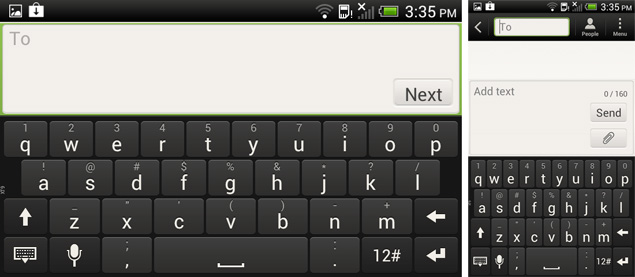
Call quality was great too with virtually zero call drops. Typing on the device feels a bit cramped in portrait mode and you can't help but switch to landscape orientation for a more comfortable typing experience.


The One V boasts impressive connectivity on both Wi-Fi and 3G networks. The browsing experience was a breeze with pages loading rather fast and giving no trouble at all. Speaking of browsing, there are a couple of new ICS features that the One V can show off when compared to its Android 2.3 companions.

One may notice In-page searching in the form of the 'Find on page' option. Further additions include tabbed browsing along with the convenience of foregoing mobile sites and heading over to the desktop version. Another welcome feature is a dedicated Forward button for easy navigation. All these features are easily accessible through the Menu option on the right hand corner of the screen.

Audio quality on the device isn't perfect either. The Beats Audio integration only enhances the sound which works alright when listening to certain type of music but might get frustrating with others, especially with the earphones. If you choose to listen to music on the audio speakers in a smaller, less noisy environment, you may be satisfied. But take the phone into a crowd and it's no good.


The smartphone comes with 512MB RAM and 4GB of internal storage which is expandable up to 32GB via microSD.

Verdict

Does the HTC One V live up to the One family tradition? It's bit of a mixed bag. The device boasts impressive specs for a mid-range smartphone, not to mention its unique design. Although it's not perfect enough, the 1GHz single core processor does keep up the pace with minor lag issues when switching between apps and menus.

It has a strong form factor that is sturdy and aesthetically pleasing, which separates it from other candybar plastic-backed offerings currently available. ICS on-board combined with the latest Sense UI is a worthwhile experience on the device. Overall, the One V is premium in looks, as well as feel.

Talking of dislikes, the audio is a bit disappointing. Probably a bundled pair of Beat headphones would work well with the Beats Audio integration. Video recording is a letdown too with the built-in digital zoom only making things worse.

If you're looking for a device with better processing capabilities then the Xperia sola (Rs. 20,449) might be an option worth considering. The device is powered by a dual-core processor and comes with a host of connectivity options including NFC and DLNA support. The downside is that it runs on Android 2.3 but an ICS update is on the cards.

Nonetheless, if you're looking for simplicity blended with excellence when it comes to getting more than just the basics right, then the HTC One V could be the Ice Cream Sandwich phone you desire.


Pros

Differentiable and sturdy design
Display
ICS out of the box

Cons

Sloppy video recording capabilities


Price: Rs. 19,399 (As on July '12)

Ratings (Out of 5)

Design: 3.5
Display: 3.5
Performance: 3.5
Software: 3.5
Battery Life: 3.5
Value for Money: 3
Camera: 3
Overall: 3.5

Friday, March 23, 2012

Facebook photos get upgraded, now share those embarrassing moments in HD!

With the megapixel counts on camera reaching higher into the double digits, it's only natural that the most common medium of sharing these images do justice to them. Facebook has been on the path to improving their photo delivery system, but it seems like they might have finally come of age.

Last night, the updated photo viewer was rolled out to users of Mozilla Firefox and Google Chrome. The new photo viewer now allows viewing of images up to 2048 pixels (on the long edge) including full-screen support. It seems like the rollout has not yet reached all users, but we were lucky enough to be the first few to get this new feature.


For our test purposes, we uploaded six full resolution images to a test gallery and looked at how our viewing pleasure was enhanced. Upon first clicking on a photo, it opened in 900 pixels resolution. To view the photos in full screen mode, we had to click on options and select "view full screen" at the bottom of the image, or by clicking on the little "expansion arrow" that hovers on the top right edge of the photo.


The resolution on our uploaded images was that of 10 megapixels, but the full screen displayed our images in an 1100x730 pixel resolution, but that was due to a lower native resolution on our display monitor. When we viewed the same images on an iMac, they popped on our screen in their full 2048 pixel glory. Browsing through them using the keyboard was smooth as well, but that also essentially comes down to the hardware you are running.


While the ability to upload and display high resolution images is great for most people, the one major drawback is that Facebook still allows anyone who can view your photos, to download them in the full resolution (2048 pixels on the long end). This might deter many photographers from using Facebook as the primary platform for showcasing their works. Despite the one drawback,viewing images on the new photo viewer is definitely a visual treat and would serve you very well if you enjoy the "bigger picture."

Windows 8 scheduled to be released in October 2012


Windows 8
Consumer Review was recently released so that people could get a hold of what the new operating system is all about. In fact, Microsoft stated that it is the company’s most successful product preview as of date with millions of downloads being done in its first week of being released. Nevertheless, the Consumer Preview won’t be there for long and once Windows 8 is released, the preview will stop working.

It is expected for the new operating system to be released some time in 2012 but the exact date on when it would be available were unclear. However, based on a report by Bloomberg, the company is expecting to launch the new operating system in October this year. In fact, there will be versions for both PCs and tablets which will definitely be something interesting to look at. Both Intel and ARM based processors will be released together with the operating system.
 

For those that are still unaware of what is happening, Windows 8 is the next operating system by Microsoft. It will feature a touch interface that will definitely revolutionize the way people do their daily computer activities too. Whether it is a hit or a miss, it is yet to be known but we hope it won’t turn to another Vista.

Tuesday, July 5, 2011

New Android Phone-Samsung Galaxy S II

Introduction

Last year, the Android ecosystem grew exponentially, leap-frogging the dominant market share held by Apple and finally giving users a smartphone option to the iPhone. At the head of the Android charge was the HTC factory, but it was the Samsung's Galaxy S that came in from the outside to conquer the Android universe.  Now, enter the Galaxy S2, the heir to the throne. But the battle of the phones has only just begun with Apple's iPhone 4, LG's Optimus 2x and HTC Sensation hitting Indian shores. So can Samsung  improve upon their flagship smartphone?


Packaging and Content

Samsung has always been pretty good packaging wise and they have not disappointed this time round. The Galaxy S2 gets a very premium looking package that oozes class.  Content wise, the usual suspects are all there. There's the Galaxy S2 itself, along with a very plush looking felt-type case, standard charger, USB data cable, Samsung headphones and the 1650mAh battery. Unfortunately, there's no HDMI cable but we are guessing most won't feel it's absence.

Sadly for Samsung, someone on the packaging chain was sleeping on the job as the slide-out cover of the package had 'SuperAMOLED+' misspelt all over it.


Hardware and Styling

At only 8.5mm thin, the Samsung Galaxy S2 is the sleekest smartphone available in the market. It even has a large 4.3" SuperAMOLED+ display that takes center stage.  Apart from the titanic SuperAmoled, there is the home button which is well backed up with touch-based menu and back buttons. Samsung has wisely used Gorilla Glass, which protects the large screen from all kinds of scratches and smudges. There's even a 2 mega-pixel snapper on the front. The rear end of the device is covered by a textured plastic, which has a matte finish. This, we believe, is a welcome change from the original Galaxy S, the glossy black plastic on which was a finger print magnet. There is an 8-megapixel camera with LED flash. The sides of the device are tapered with a metallic finish. The volume rocker is located on the left hand side and, weirdly, the power button is placed on the right hand side. The bottom end of the device houses the micro-USB port, which also doubles as an HDMI port through an adaptor. The top houses the standard 3.5 mm port.


At first glance, the Galaxy S2 does not feel like a premium device because of the plasticky nature of its construction. Next to the iPhone 4, it's like chalk and cheese. In spite of this the device is very well put together even though it might give the illusion of shoddy construction.

Stylistically too the device boasts of a very minimalistic bare-bones design. With the abundance of plastic prevalent in its construction, it is very light at only 116 grams.
 

Interface

The Galaxy S2 comes pre-loaded with Android 2.3 Gingerbread. Samsung has, as usual, added its TouchWiz skin over Android. TouchWiz - now in its 4.0 version - is a much-improved skin than its previous iterations. Many hate the inclusion of custom skins but, surprisingly, TouchWiz 4.0 is a boon to the user.

Interface wise, there is not a lot of difference except the fact we get custom widgets optimized for TouchWiz and dock bar, which can be customized according to users' whims and fancies.


Samsung has introduced a couple of neat touches in the contacts and call history menus. If one has to call or message a contact one just needs to swipe the contact towards the right for calling and towards the left for messaging. This reduces the steps involved in calling and messaging. Definitely a neat feature.

Icons, as usual, look like cheap iPhone rip-offs but even that is quite bearable thanks to the lovely SuperAMOLED plus display gracing the Samsung Galaxy S 2.

Also, TouchWiz allows users to scroll horizontally rather than vertically in the applications menu. It also allows users to change the font of the device. This change even  translates to webpages.

The on-board keyboard is a beauty. Thanks to the large display there's ample real estate to navigate your fingers on the virtual keyboard. Samsung has also managed to improve the auto spell correction abilities of the T9 dictionary. There's also SWYPE, though one needs to get used to SWYPing rather than typing. For now, we will stick to the virtual keyboard - its not too shabby, you know!

Samsung has added some specialty tricks to the Galaxy S2 as it utilizes its gyroscope more than any other device has to-date. On the web browser, with double finger tap we can engage the tilt zoom by moving the device. Similarly, we can move widgets on the home screen through these double taps. This very cool indeed and comes in handy.


Multimedia

In the age of the iPad which rules the world of media consumption, manufacturers are striving to create smartphones with the double whammy of large screens and  the horsepower of tablets. Essentially, the Samsung Galaxy S2 is the synthesis of this very ideology.
The star is the mouth-watering 4.27" SuperAMOLED plus display which is, to the naked-eye, the best smartphone screen available on the market.

While the iPhone 4 boasts of a 'Retina Display' with a resolution of 960x640 with 327 PPi (Pixels Per Inch), the Galaxy S2 responds with a somewhat middling 800x480 display. In spite of this disparity, we find the Galaxy S2 has a brighter and richer display with fantastic viewing angles. Why? According to Samsung, 'the secret sauce' is hidden in the sub-pixels. While the Galaxy S2 has fewer pixels than the iPhone 4, it has twice as many sub-pixels as the original Galaxy S, which in it-self was pretty sweet display wise. Add to this the fact that the Galaxy S2 eclipses the iPhone 4 display in size by almost an inch and it's a no brainer. Watching a video on the Galaxy S2 is truly a delightful experience - easily the best.  Though we would still say the iPhone has the sharpest display in town.

The phone features the stock Android MP3 player which also has Dolby 5.1 support. While the sound quality on its own is quite stellar, the activation of the Dolby 5.1 produces sound which detaches all the frequencies and one can hear every note or beat in its entirety. Obviously, the surround sound element is also there with channel sweeps happening all the time. The Dolby functionality will not appeal to the layman as it would produce an aurally weird experience but still is a very interesting feature to have on board, especially for audio junkies.
Samsung has jazzed up the MP3 player with various equalizers and sound modes, which enhance the customization options. Google really needs to provide users with better stock MP3 player; hopefully Ice Cream Sandwich may be the answer to the prayer.
There is the standard Android video player, which can handle most common video codecs such as .Avi, DivX and Xvid. All videos work smoothly sans the glitches and this is something new for an Android device.
Now, the 8-megapixel camera with LED flash in the rear and a 2-megapixel camera on the front for video chats. The rear camera is surprisingly clear providing detailed pictures, which stack up well against the imaging capabilities of the Sony Ericsson Xperia Arc and the Nokia N8. We noticed minimal noise and graining in the images, which is rare for a mobile camera.  Even in low light conditions, the camera performed superbly thanks to the LED flash only to be pipped by the Xenon Flash of the Nokia N8.

As far as 1080p recording went, things were smooth and the video was crystal clear. In comparison to the LG Optimus 2x, these videos were slightly clearer with better contrast and they were jitter free. The built in image stabilization definitely was brilliant.

The Galaxy S2 provides HDMI mirroring facilities through a proprietary HDMI connector and also supports Samsung's AllShare technology for sharing content.


PC Sync and Market

Changing a device brings with it the mammoth task of data transfer - especially painful is the transfer of contacts. Thankfully, Android smartphones are amongst the easiest devices to sync data with thanks to a wonderful thing called Google Contacts. All you have to do is sync one's device with Google Contacts and you are ready to go. Make no mistake, Google Contacts is a vastly useful tool given the host Gmail users floating round the web, and this just increases the appeal of Android devices as Google users get the best possible experience of all Google applications on Android.
Samsung added their Social Hub functionality to TouchWiz. Social Hub is designed to be the single point of entry for users to enjoy their social content. Be it Facebook, Twitter, LinkedIN, MySpace or even a basic Email or SMS, all these functions can be accessed from the Social Hub.  While it may not be as intuitive as the HTC's "Friends Stream" it gets the job done and that will be enough for most people. Those not satisfied can always download the Facebook and Twitter apps, which come for free.
With syncing on the Galaxy S2, Samsung has pushed the envelope further with the Kies Air app built in to the device. Kies Air adds Wi-Fi sync capabilities with the user being able to accesses each and every shard of information stored on the computer. All one has to do is enable the app on the phone which will pop an IP (Internet Protocol) address on the phone which one has to enter in the web browser. From the laptop's web browser we could see everything, even our SMS threads. We could also easily transfer data easily including music, videos and photos. This app goes long way in cutting the cord with USB.
Like the Apple App store, the Android Market is the largest haven for Android apps. Android Market at the moment in home to more than 290,000 apps and Google expects it to overtake the Apple app store by August.

As we know, Android is an open-source platform so app developers have more leeway in making apps they like. But this is also coupled with poor quality control on Google's part, which gives Android Market the unwholesome flavor of a flea market. For instance, Fruit Ninja has quite few clones running round - like Fruit Cutter. Some are very good but, unfortunately, many are just dreadful.


Essential Apps

Samsung has always been in a habit of loading its devices with a lot of bloatware but, luckily, this time round they have provided only the necessities, though we still do get a lot of stuff.

As expected on an Android device, we do get our share of standard Google Apps such as Gmail, Search, Gtalk, Maps and Latitude. All these work exactly like they work on other devices, obviously the experience is a tad smoother on the Galaxy S2 thanks the extra processing mojo.

Samsung has provided its FM app, which we have always loved. It has a very cool virtual dial through which we can modulate the frequency of the FM station. Sound quality is also pretty impressive considering we were able to get a decent signal in the basement.

We get Samsung's 'patented' Hubs, which include the Readers Hub, the Social hub discussed above, and the Gamers Hub.

The Readers Hub is designed to provide users a single of point of entry to the world of print. The Books section is powered by Kobo's E-Book service, the magazine service is powered by Zinio's popular service and the news service is powered by Press display.

We also get Polaris Office, which has become quite popular among OEMs as it provides impressive document editing capabilities handling all Microsoft Office formats natively. It also acts like a file manager and syncs with Box.net accounts what more one needs. Unfortunately Polaris Office does not always handle Microsoft Excel formulas properly, which can be quite problematic for power users.

Samsung has also provided apps for basic Photo and Video editing.


Performance
 

Most people who buy touch smartphones are looking for an iPhone like experience and too many Android devices fall short in this respect. Even the dual core Tegra 2 powered LG Optimus 2x never came close. Samsung believes the Galaxy S2 will. To ensure it does, they have given it a 1.2 GHz dual core processor based on the ARM architecture but made in-house. They have also added 1GB of RAM to boot. That's a lot of firepower; this would even put the USS Nimitz to shame!

We have some staggering statistics to prove this theory. In our Quadrant benchmark test, the Galaxy S 2 scored a blistering 3212. To add some perspective to this we compared it to the Nvidia Tegra 2 powered LG Optimus 2x which managed just 2436 in the same benchmark.

In the Linpack test again the Galaxy S2 came up trumps as it scored 47.257 MFLOPS in 1.77 seconds while the Optimus 2x only managed 35.389 MFLOPS in 1.57 seconds.

Even in the Benchmark Pi test, the Pi was calculated in 617 milliseconds while the Optimus 2x lagged behind at 700 milliseconds.

But the real kicker came in the Rightware Browsermark test in which the Samsung Galaxy S2 scored an unheard of 72879 which was even faster than the iPad 2 at 69760. The LG Optimus 2x lagged way behind at the 42300 mark.

Even the call quality was much improved from the original Galaxy S. However, it still cannot compete with the likes of Nokia and BlackBerry.

Thanks to the large 1650mAh battery we did not face the usual battery issues associated with smartphones with large displays. The battery easily lasted a day with constant 3G and Wi-Fi usage. Along side this we made our usual round of calls and also utilized the Wi-Fi tethering functionality.

It is clearly the most powerful smartphone money can buy at the moment.

On a disappointing note, our review unit suffered from over heating issues which resulted in the phone hanging. Often the touch based buttons would stop functioning and the touch display would not be able to differentiate between various gesture commands. We believe this is due to a fault in our particular unit, as no one else has faced this problem but if it's a defect troubling the entire production line then Samsung must get it rectified quickly. Some of these errors include unnatural heat generation in the SuperAmoled + display while others include improper color reproduction in displays. These are massive production oversights and, as far we can gather, almost limited to India. Samsung better tighten up its act as the HTC Sensation is a pretty polished device and not far behind as far as hardware artillery goes. So consumers, beware!


Verdict

If there is a smartphone out there which manages to provide the sheer speed of the iPhone then it has to be the Samsung Galaxy S2. There are no two ways about it - it is currently the fastest phone in the market and quite reasonable priced at Rs 32890, given the amount tech crammed into it. It even manages to eclipse the iPhone's Retina display, which is a feat in itself. While all this is good we still don't like Samsung's TouchWiz in-spite of all the improvements.

Buy it if you need the sheer speed and the geekyness of Android. Don't buy it if you don't like the look of TouchWiz.


Specifications

Pros


Sublime performance
Slim Design
Good Camera
Brilliant Screen
Good Battery Life
Motion controls


Cons

TouchWiz
Over heating issues
Underwhelming Build quality


Ratings

Performance:  5
Price:  4
Ease of Setup: 4
Ergonomics: 4
Wow Factor: 4.5

Monday, July 4, 2011

Review: Dell XPS 15z

Intro

Apple, be warned: the Dell XPS 15z has definitely got the 15-inch MacBook Pro in it's sights. Elegantly designed, with an aluminum chassis, chrome strip and a well laid out keyboard, it's clearly gunning for Apple's high style quotient. The hardware under the hood is quite impressive as well. But is all this enough to steal the MacBook Pro's thunder?

Packaging and Contents

The packaging is what we've come to expect from Dell's XPS series. A stylish box houses the device along with the charging adapter and a bunch of CDs.


First Impression

Look at the device from a distance and you will be forgiven for mistaking it for a MacBook Pro as it has the same silver matte finish. But what distinguishes it is a unique hinge, prominent Dell logo and a chrome strip around the border. Lift the lid and you will be greeted by a 15.6-inch Full HD Widescreen display and a well laid out, backlit, chicklet style keyboard.
 

Our instant reaction when lifting the device - it's really heavy, but the build quality is extremely good.

 
Performance
 

Straight off, for a machine that costs Rs. 80,900, it boasts of some impressive specs including 8GB RAM, 750GB HDD, a Sandy Bridge 2.70 GHzcorei7 processor and a 2GB NVIDIA 525M graphics card. Two USB 3.0 ports also make an appearance. Too bad Dell couldn't round up the package with a No Blu-ray drive, as the device possesses a standard read/write dual layer DVD drive. The device also has a gorgeous full HD 1080p display.


On PC Mark, the device had a score of 8518 so you can expect it to do some serious multi-tasking with ease. Converting video, listening to music, downloading a file from the Internet and copying a file to a thumb drive were all executed simultaneously.


The hinge that holds the screen in place is by far one of the best built we've ever seen in a notebook. The keyboard on the device is very unique. If the Lenovo G570 has great rounded keys, then the Dell XPS 15z takes it to the next level. The chicklet style keyboard has rounded individual keys that feel a little smaller than what you'd expect but are very comfortable to type on. The keys themselves are soft and well spaced out, thereby allowing little room for error.

The F1 to F12 keys can be used for functional controls such as brightness, volume, media controls etc. To control these functions you need to hold down the "fn" key. We would have liked to see an option to have these keys dedicated to functions without the use of the 'fn' button.


Unlike the Mac or other laptops that lets you control the level of backlighting on the laptop, the 15z has just one setting - on/off.

Just like the MacBooks, the 15z has a slot loading drive rather than a DVD tray. This adds to the ergonomic and novelty value of the device.

In terms of connectivity, the device houses an HDMI out, mini display port, e-SATA cum USB 2.0 and two USB 3.0 ports along with a 7-in-1 card reader on the left. Another cool feature picked straight out of the MacBooks is the LED battery indicator located on the left panel. There are 5 led lights and the number of lights that glow indicates the battery level. The device need not be turned on to check the battery level and it's a quick and handy way to see how much juice you've got left. Previously, Dell housed this same feature at the bottom panel of the device and we are glad to see it repositioned to the left panel.

On the right, the device houses the slot loading dual layer DVD drive alongside one headphones and microphone jack. Previous Dell laptops have been credited with housing two headphone jacks. It was a handy feature and we definitely felt the absence of the second jack on this machine. The charging port is located at the rear of the device.

The trackpad is fairly large and has dedicated left and right click buttons. Going the Apple way, Dell has incorporated multi-touchcontrols on the trackpad. You can now use two fingers to scroll horizontally and vertically. The scrolling experience fells rough on the plastic trackpad and you will most likely use the traditional method of click and drag to scroll.

         
The 6-cell lithium ion battery of the device is a bit disappointing. On the Battery Mark test the device scored 110423. Push the device to its fullest potential and it will last you for 1 hour 51 min. Use the device sparingly and the test shows that the device will last for about 4 hours. We expected a bit more from the battery life of the device. 

Multimedia

You will undoubtedly use the device to browse the Internet watch videos and listen to music. On this count, the Dell XPS 15z performs well. The device has a beautiful 1080p display and movies look great on it. The colours produced on the display lack a bit of vibrancy. We noticed this, not while doing regular work, but when watching  full HD movies such as Avatar, Tangled and Megamind. The display is a great USP especially if you are one who is a HD buff and like all your videos in 1080p.

The audio produced from the speakers is relatively loud, the vocals are clear but the speakers lack bass. The Dell XPS L501X had a dedicated JBL 2.1 speaker system that sounded awesome. These, however, can't match up to those but produce great audio none-the-less with a bit of sacrifice on the bass.   

Gaming
 

With a 2GB Nvidia 525M graphics card, a 1080p display and a 3D mark score of 7381 users can really expect to push the device to its limit. We played a bit of Crysis 2 on it. Pushing the graphics settings to hardcore and resolution to 1080p, the game ran but we faced a lot of lag. Reduce the settings to moderate and you can have a decent Crysis 2 experience.


This may not be ideal for a dedicated gaming notebook. You may want to take a look at the Alienware series for that, but for those of you that need a machine for dedicated processing and a bit of gaming on the side can consider picking this one up. 

Verdict

The Dell XPS 15z is a great overall package. Take it's claim of being one of the thinnest notebooks around with a pinch of salt though - it isn't. Though it's a bit heavier than we would like, the build quality is splendid and the internal hardware impressive. If you need some serious power under the hood of a notebook, the XPS 15z should definitely be on your list.

Pros
Very good build quality
USB 3.0
1080p display
Loud speakers
Great keyboard


Cons
Heavy
Battery life
Would Blu-ray be too much to ask for?

Price: Rs.80,900


Specifications:

Processor: Intel Core i7 2.7GHz
RAM: 8GB DDR 3
OS: Windows 7 home premium 64-bit
HDD: 750GB
Graphics: 2GB Nvidia 525M
Display: 15.6-inch 1080p
Backlit keyboard
6-cell lithium ion battery


RATINGS:
Performance: 4
Price: 4
Ease of setup: 5
Ergonomics: 4
Wow Factor: 4
Overall: 4.5
 

Benchmark scores:
3D Mark: 7381

Battery Mark: 110423
Forecast: 3 hours 47 min 16 sec
Test: 1 hour 51 min 13 sec.

 
PC Mark Vantage:

PC Mark Score: 8518
Memories score: 4678
TV and Movies score: 4592
Gaming Score: 5168
Music Score: 7192
Communications score: 10597
Productivity score: 6972
HDD score: 4226